
Assistant-native connections · Series C
MCP-connected financial planning software for biotech: check scope before writes
A connection can expose more than one company or model. Choose software by what the assistant can read, change and recover.
First-party editorial: we make TrialAgents Runway. Primary documentation reviewed 14 November 2026. This is a selection framework and proposed demo exercise, not a completed host or competitor test.
Ask which plan the assistant will touch
Choose an MCP-connected finance app only after you can identify the target workspace, the readable data, the allowed writes and the recovery route. For a fractional CFO serving several biotechs, selecting the right company is as important as selecting the right forecasting function.
MCP’s architecture defines how hosts, clients and servers exchange context and expose capabilities such as tools and resources. It does not by itself establish a product’s financial model, approval policy or interactive interface. A visible tool list is a starting point, not a finance acceptance test.
TrialAgents brings Runway into supported ChatGPT and Claude workflows, with an interactive app where the host supports it and continuation in the browser. You can customize the whole app or build a bespoke version, add other apps with explicitly connected shared data, and configure access and optional automations. That flexibility still needs a defined data boundary: installing Runway does not automatically bind another app’s tables or import accounting data.
| Boundary | Evidence to request |
|---|---|
| Identity and scope | Signed-in account, organization/company, selected app or model, and scenario |
| Reads | Accessible inputs, time period, currency and any missing or restricted records |
| Writes | Exact target, old/new values, approval point and where the result persists |
| Recovery | How to inspect an uncertain result, reject stale changes and restore a reviewed value |
Compare the connection contract, not the badge
These three documented pathways serve different planning needs. This is a conditional shortlist, not a measured ranking.
| Product and fit | Documented connection | Boundary to verify |
|---|---|---|
| TrialAgents Runway Customizable biotech cash planning | ChatGPT/Claude authorized app workflows; browser inputs, previews and reviewed saves | Requires setup. Confirm selected app and bindings; embedded UI depends on host. Scheduled execution is separate. |
| cfo.ai Connected financial model | Remote HTTP MCP with OAuth; setup examples for Claude Code and Codex CLI | Requires account/workspace access. Do not infer identical ChatGPT or Claude web behavior from CLI examples. |
| LivePlan Business plan and financial forecast | Early-access MCP; vendor says designed/tested for Claude and provides other-client setup | Confirm company/account and tool eligibility. This review does not verify embedded UI or other-host parity. |
Runway: its approved 2.1 model separates input records from calculated forecasts and frozen closes. Writes pass through review; scenarios begin as unsaved previews. It is useful when you want an adaptable monthly operating plan, but it has no native bank/accounting sync, payroll, three-statement model or 13-week liquidity engine.
cfo.ai: the official setup guide distinguishes account access, authenticated MCP and a working model. It calls for selecting the intended workspace and proving a read-only operation before declaring setup complete. Use current client-specific instructions; configuration alone is not evidence of access to the right model.
LivePlan: its connector documentation lists plan, forecast and scenario reads and writes. A profile can reach multiple accessible accounts and companies, making explicit selection essential. The connector is early access and warns that changes may not be easily reversible; check current eligibility and confirmation settings before a write.
Try a bounded read-to-write exercise
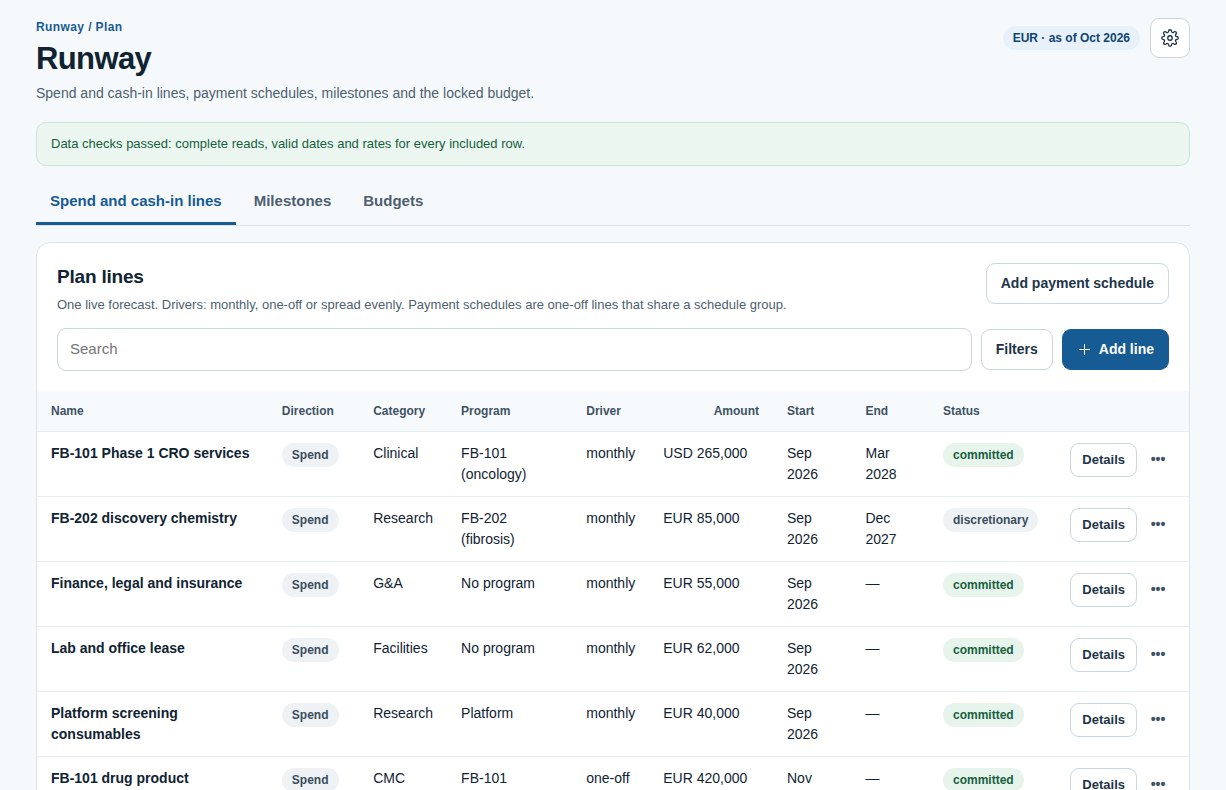
Use a separate authorized demo with complete input access. Our fictional brief is deliberately small: Demo Biotech A has a committed one-off EUR 40,000 Research line named “Assay validation,” scheduled for April 2027. You want to propose moving that single payment to May. This is a record-scope exercise, not a runway calculation or a change to contractual obligations.
- Name the target. Record the host, connected service, workspace, app/company and selected model or scenario. If several companies are accessible, select Demo Biotech A explicitly. Do not create a second workspace to resolve ambiguity.
- Prove a read. Ask for the saved line’s identity, amount, currency, status and month. Compare with the browser. Stop if the result is incomplete, restricted or from the wrong company.
- Request a proposal only. Ask for April → May on that one line, preserving EUR 40,000 and committed status. No forecast outputs, other companies, milestones or recurring lines should be changed.
- Inspect approval. In Runway, review the exact record change before saving. If the one-off line has an end month, keep its start/end consistent. If permissions deny the action, stop; do not widen access merely to finish the test.
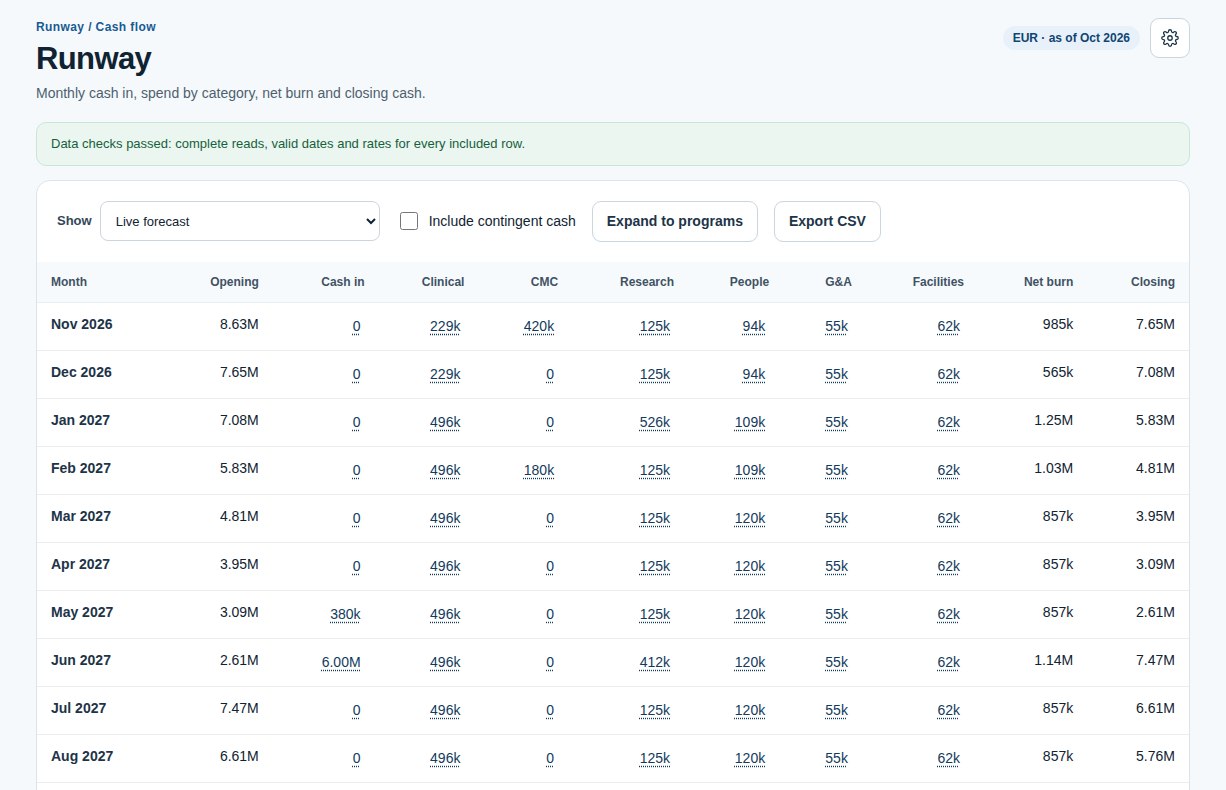
- Reopen and reconcile. Read the same record again and inspect Cash flow. For this isolated payment, April spend should be EUR 40,000 lower and May spend EUR 40,000 higher; the two-month total is unchanged. Other inputs must remain unchanged.
- Check an uncertain outcome. If the assistant loses its response, inspect the saved record before retrying. Do not repeat a create or edit blindly. Restore April only through another reviewed change if you want to reset the demo.
Read Demo Biotech A’s selected Runway app. Identify the saved Assay validation line and report its currency, amount, status and month. Propose moving only that one-off payment from April to May 2027. Preserve its amount and status. Do not save, create duplicates, change other records or write calculated outputs.
The arithmetic check is simply EUR 40,000 + EUR 0 versus EUR 0 + EUR 40,000. It checks timing and scope, not overall cash sufficiency. For a broader forecast exercise, see the Claude cash-flow review.
Keep the browser and recovery route usable
Our acceptance rule is straightforward: the same person should be able to identify the target, understand the proposed change and verify the saved result without trusting chat wording alone. Retain a short record of the host, reviewed input, approval and reopened result. Treat an untested recovery path as unfinished evaluation.
Runway’s documented version checks reject stale record changes; a rejected proposal is a reason to reread and review, not overwrite newer work. If the assistant is unavailable, continue in the browser. If exact totals are withheld because required data is inaccessible, resolve access with the owner rather than reconstructing a total from partial rows.
Choose the planning model that fits your work, then test its MCP boundary. Use our Claude planning comparison for model ownership and workflow fit. A successful bounded edit establishes that one tested action—not universal integration coverage, host parity or unattended execution.
Start with Runway
Build a reusable biotech cash plan with explicit inputs, reviewed changes and a browser workflow your team can inspect.
Start with Runway →