
Assistant-native workflow · Series C
How to use Claude for biotech cash flow forecasting
Turn a delayed-grant question into reviewed assumptions, an app-calculated forecast and a decision brief that exposes the cash gap.
First-party editorial: we make TrialAgents Runway. Documentation reviewed 14 November 2026. This is a reproducible recipe with independently checked fictional arithmetic, not a completed Claude acceptance test.
Let Claude prepare the question; let Runway calculate
Use Claude to identify missing assumptions, prepare reviewed input changes and explain a forecast calculated by TrialAgents Runway. A fluent answer in chat is not a saved financial model. Keep the opening balance, spend, financing status and scenario in the app so another team member can inspect them.
TrialAgents supports conversational app work through Claude and ChatGPT connections, plus an in-chat interface where the host supports it and a browser workflow. You can customize the whole app—fields, views, calculations and workflows—or build a bespoke version. Expand it with other apps and explicitly connected shared data, then configure access and optional automations. This exercise uses the standard monthly model, with every data change reviewed.
The useful question is specific: “If our expected grant arrives in July instead of April, do we run out of cash before it arrives?” That question differs from choosing among financial planning apps for Claude: here, you already have a planning home and need to verify one assumption.
Confirm the connection and the planning boundary
Use an authorized demonstration workspace with Runway saved and its required data accessible. Connect TrialAgents using its current connection instructions and the endpoint supplied by the platform. Anthropic’s custom-connector guide explains the account and organization setup; adding an MCP connection alone does not establish an interactive app interface.
| Surface | Role in the workflow | Evidence boundary |
|---|---|---|
| Claude | Read authorized inputs; propose supported changes; explain app results | Documented workflow; connection and permissions require setup. End-to-end execution and embedded UI not tested here. |
| ChatGPT | Separate supported assistant pathway | Outside this walkthrough; do not infer identical controls from Claude. |
| TrialAgents web app | Inspect inputs, build previews and review calculated cash | Runway 2.1.0 documentation and genuine browser demo media reviewed; the example below was independently calculated. |
Claude’s connector permissions depend on connected-service access, and organizations can restrict actions. Confirm the intended workspace and app before reading or proposing writes. If the app interface is unavailable in chat, open it in the browser. A permission failure is not a reason to reconstruct missing totals from partial data.
Run a six-step review of delayed funding
- Read before changing. Ask Claude to identify the saved app, as-of month, reporting currency, opening balance, financing statuses and missing-data warnings. Withhold a cash conclusion if required tables, salaries or currency rates are unavailable.
- Prepare the fictional baseline. In a separate demo, use EUR 900,000 at 31 December 2026; committed G&A spend of EUR 150,000 each month from January through December 2027; one committed EUR 300,000 Research payment in March; and a contingent EUR 600,000 grant in April. Use one-off drivers for the payment and grant. No positions, other cash-in, FX changes or reserve are included. Do not seed these figures into a real company plan.
- Review the inputs. Ask for a proposed batch, inspect dates, currencies and statuses, then approve only the intended records. Keep the grant contingent: a hoped-for award must not silently enter the committed base forecast. For existing spreadsheet inputs, use the reviewed mapping guide.
- Build a transient preview. Ask Claude to describe “Move a cash-in line” for the grant, +3 months. Build that change in Scenarios. It moves the expected receipt from April to July without changing its amount or funding certainty. A preview is not a saved scenario or an adopted forecast.
- Inspect both views. In Cash flow, compare the live forecast and preview with contingent cash excluded, then included. Drill into the months around the delayed receipt. The base view should remain unchanged; the contingent-inclusive view should expose the intervening gap.
- Save only the reviewed decision. Request a brief naming the inputs, scenario and cash gap. If you want to retain the scenario, save it through the separate scenario and changes reviews. Adoption changes live inputs and needs its own review; an outdated scenario must be refreshed. Reopen the app to verify the saved result.
Read our selected demo Runway app. Identify the contingent grant by its saved record. Describe a preview moving that receipt from April to July 2027, without changing its status or amount. Do not write records or calculate replacement forecast outputs. Tell me what to inspect in Cash flow with contingent cash off and on, then summarize only the results I confirm from the app.
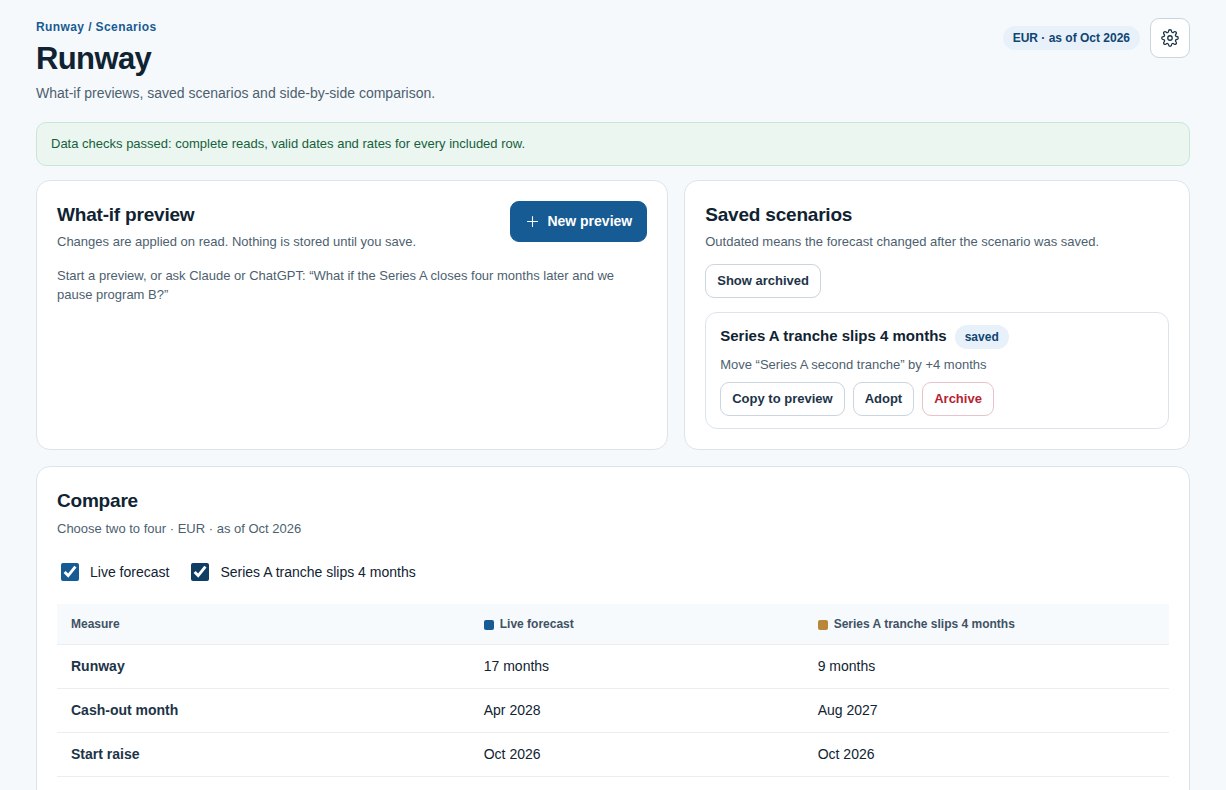
Check the months before the grant arrives
The following is an independent arithmetic check, not an app capture. Each closing balance equals the previous closing balance plus included cash-in minus spend. January closes at EUR 750,000 and February at EUR 600,000 in all three cases.
| 2027 month | Base: no contingent grant | Grant included in April | Grant included in July |
|---|---|---|---|
| March | 150 | 150 | 150 |
| April | 0 | 600 | 0 |
| May | −150 | 450 | −150 |
| June | −300 | 300 | −300 |
| July | −450 | 150 | 150 |
July’s positive balance does not erase May and June’s gap. Moving the grant changes timing, not total funding. Under Runway’s first-negative-month convention, base cash-out is May; including an April grant moves it to September, while including a July grant still leaves the first shortfall in May. April’s zero balance is not a cushion. The model permits negative balances to reveal a gap; it does not supply a borrowing facility.
If your app differs, check the opening month, recurring end date, one-off driver, grant status, source selector and contingent toggle before editing anything. The standard app is monthly: it cannot establish that cash is sufficient on every day within a month. It is not bank synchronization, bookkeeping or a 13-week liquidity model.
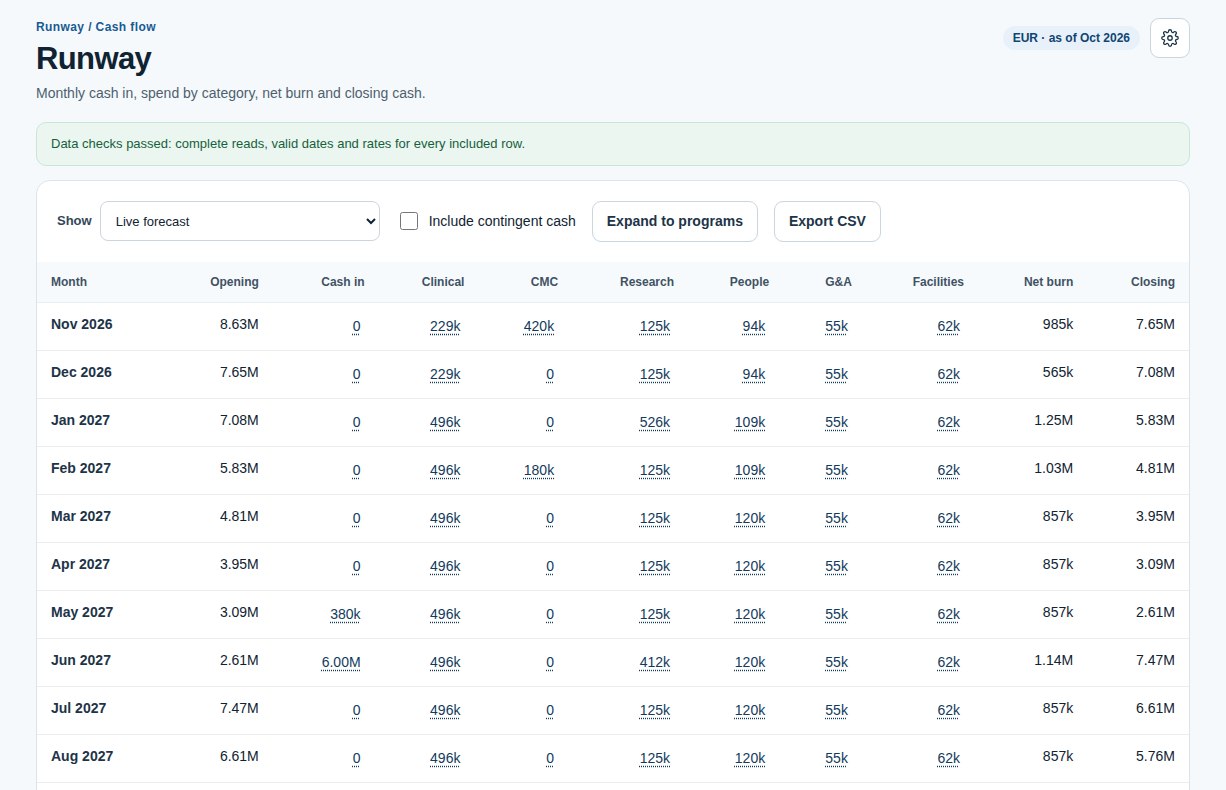
Finish with an owner-reviewed brief: the expected funding date, the first shortfall, unresolved assumptions and the decision requiring follow-up. Claude can help write that explanation; the finance owner validates cash inputs and leadership decides what to change. Continue in the browser if the assistant is unavailable. Configure any recurring monitoring separately—this workflow does not establish a background runner.
Start with Runway
Keep your biotech cash assumptions, scenario comparisons and reviewed decisions in one reusable app.
Start with Runway →