
Getting started · Setup and migration
Move your biotech cash forecast from Excel to TrialAgents Runway
A practical mapping and reconciliation guide for turning your reviewed spreadsheet inputs into a connected planning app.
A first-party implementation guide based on Runway 2.1.0. The numerical check is fictional; this is not a claim of a completed customer migration.
Use the mapping checklist below to prepare records with your assistant, review the proposed changes and validate Runway against your source forecast. Keep the workbook until the app’s monthly cash and important assumptions are approved.
Keep your source workbook and define the cutover
Save a dated copy of the workbook. Choose the month-end bank balance that will anchor Runway, the reporting currency and the months to reconcile. Keep the original workbook as your reference until the new forecast is approved.
TrialAgents connects natively to ChatGPT and Claude: you can work in supported in-chat app interfaces, ask the assistant to prepare records, and continue in the browser. Share only the sheets or rows needed for this setup.
This is a reviewed transfer of planning inputs. Runway has no built-in Excel file parser or live Excel synchronization; workbook formulas, macros and custom model logic do not automatically become app functionality.
A controlled move from spreadsheet to app
Keep
Retain the dated workbook, assumptions and source totals.
Map
Translate inputs into Runway settings, Plan and People records.
Reconcile
Match monthly cash before using Runway as the live planning app.
Map your spreadsheet inputs to Runway
| Spreadsheet input | Runway destination | Review before saving |
|---|---|---|
| Opening bank balance | Settings | Same month-end date and reporting currency. |
| Recurring and one-off costs | Plan → spend lines | Monthly, one-off or spread driver; amount, currency, dates and program. |
| CRO installment schedule | Plan → payment schedule | One-off payments; exclude duplicate totals or deposits. |
| Current roles and planned hires | People | Annual salary, active months, program and loaded-cost assumption. |
| Funding | Plan → cash-in lines | Funding type, expected month and committed versus contingent status. |
| Key milestone dates | Plan → Milestones | Use Runway milestones or explicitly connected Programs data. |
| Historical actuals | Actuals | Map categories separately; the app creates reviewed close snapshots. |
Do not transfer calculated closing cash or runway as editable inputs. Runway derives them. If a cost appears in People, remove the same cost from your general spend lines to avoid double counting.
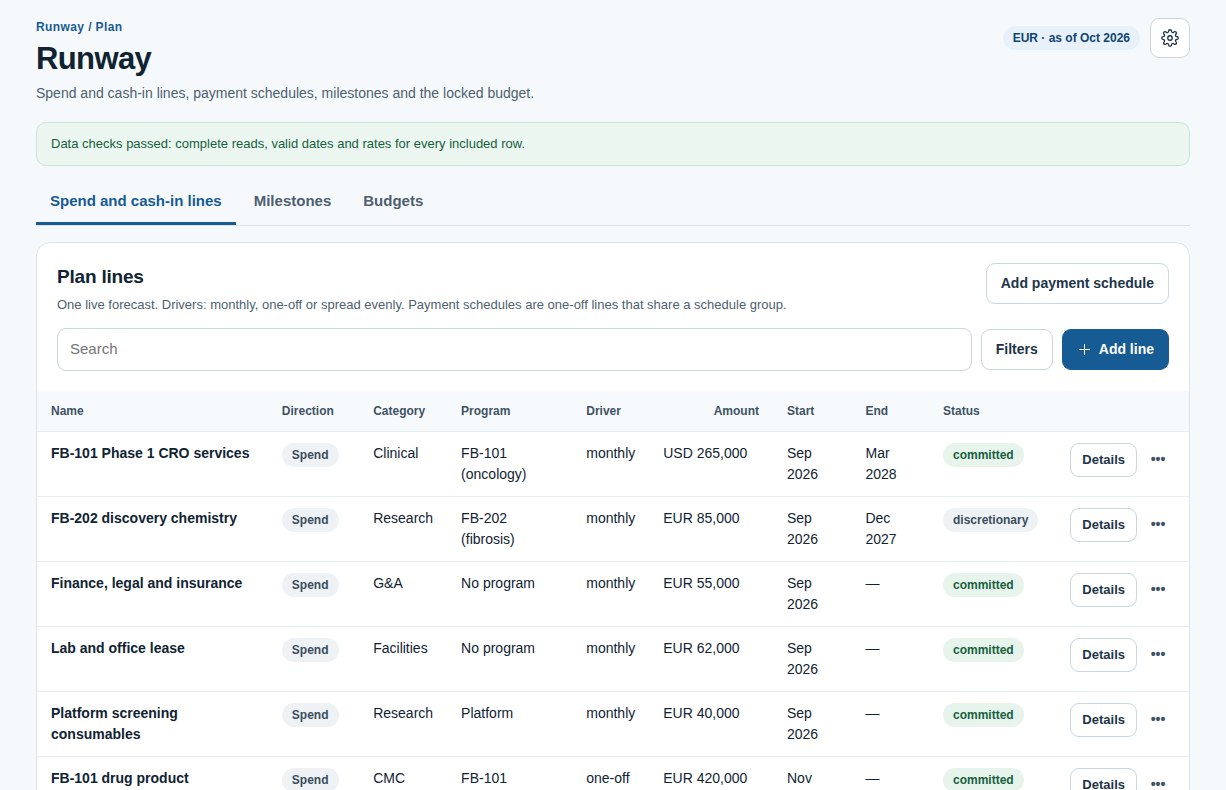
Prepare and review the first records
Help me move these reviewed Excel inputs into Runway. First show a field mapping and flag missing dates, currencies, duplicates and uncertain financing. Then prepare the proposed records for review. Preserve my workbook and do not write forecast outputs or frozen snapshots.
Set up Runway from the template, or open your saved app. Ask the assistant to reuse authorized Programs and other shared data explicitly when needed. Installing a template alone does not connect existing tables.
Review the proposed settings, programs, plan lines, roles and currency rates. Start with a small, representative set of records, resolve ambiguities, then add the remaining inputs. Nothing should be treated as migrated merely because the assistant summarized the workbook.
Reconcile monthly cash before switching
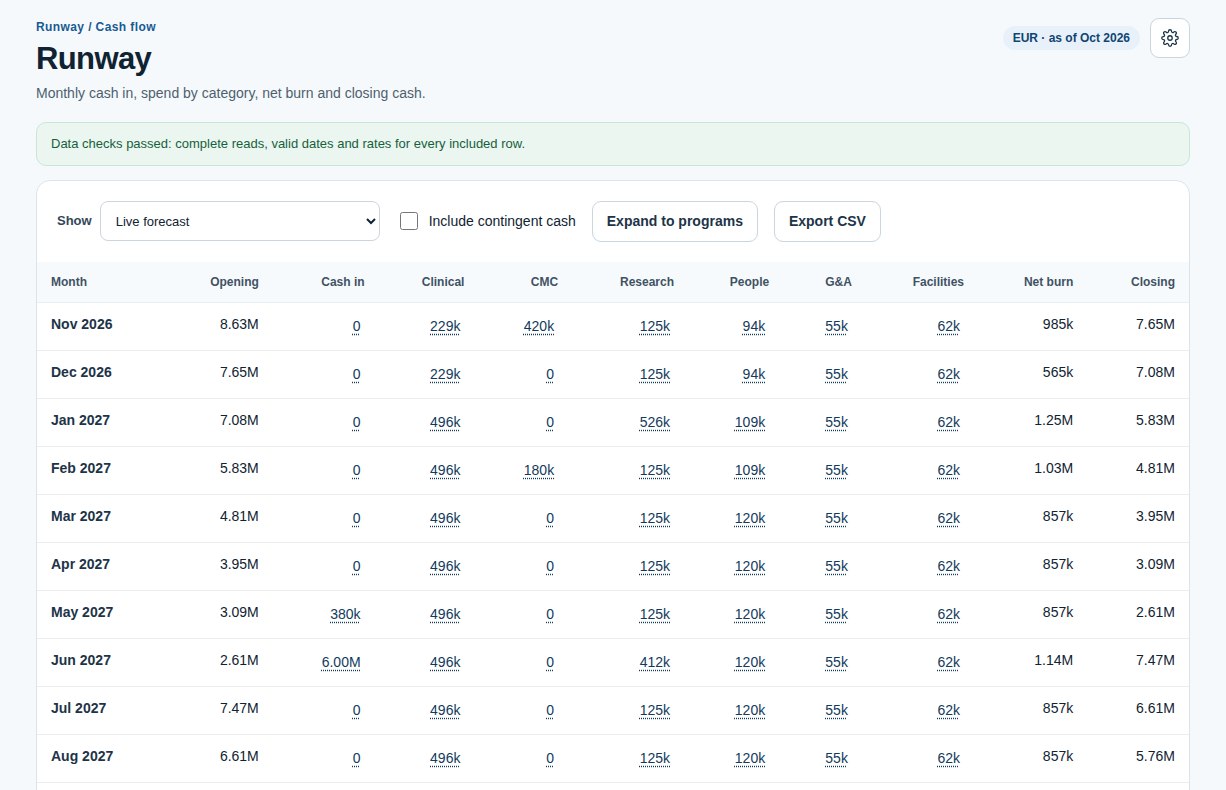
Open Cash flow and compare opening cash, incoming cash, spend and closing cash against Excel for the same months. Use the same assumptions and keep contingent financing separate.
| Input / result | Expected amount |
|---|---|
| Opening cash at 31 December | 1,000,000 |
| January operating spend | 100,000 |
| January CRO payment | 200,000 |
| January funding | 0 |
| Expected January closing cash | 700,000 |
The check is €1,000,000 − €100,000 − €200,000 = €700,000. If the app and workbook differ, inspect payment months, monthly versus spread amounts, People overlap and missing FX rates before changing either model.
Compare the full horizon after this first check. Runway’s cash-out month is the first month below zero; align that definition with your workbook. Its monthly forecast does not replace daily liquidity planning.
Customize the app, then connect your operations
Make the app yours. Ask ChatGPT or Claude to reshape fields, views, charts and workflows—or build a bespoke app for logic your spreadsheet handled separately. This is the platform’s unlimited customization advantage; changes still follow supported capabilities, permissions and review.
Add connected apps. Connect authorized program and milestone data rather than copying it between tools. Keep each source’s ownership clear.
Set the controls. Configure app access and salary-column restrictions, use logs and saved app versions, and add optional automation only when useful. In Plan, lock the reviewed annual budget when ready; use Actuals for monthly close and frozen snapshots.
Before you call the move complete
- The dated source workbook remains available.
- Every material input has a mapped destination and owner.
- Monthly cash reconciles, or each difference is documented and approved.
- Funding status, rates, duplicates and access have been reviewed.
- Your team agrees which app or workbook owns the live plan.
If a material gap remains, keep the workbook as the working forecast while correcting the proposed setup. The transfer does not delete or alter the source file.
Start with one reconciled forecast
Move a reviewed set of inputs, reconcile the monthly cash, then expand. Once the baseline is trusted, try the CRO payment-timing example or the ChatGPT walkthrough.
Move from spreadsheet inputs to a connected app.
Start with Runway. Customize it through conversation. Connect the rest of your biotech.
Start with Runway →