
Biotech finance · ChatGPT workflow
How to manage biotech cash runway in ChatGPT
Use Runway inside your conversation, customize the whole app and connect cash planning to the rest of your biotech.
A practical TrialAgents guide based on Runway 2.1.0. Prompts below are examples to adapt to your own records.
Connect TrialAgents to ChatGPT and open Runway. Work in the app alongside the conversation, ask for changes to your inputs and reshape the app around your team. Then add connected apps and optional automations as your workflow grows. Runway calculates the forecast from your reviewed data.
Open Runway inside ChatGPT
Start with a TrialAgents account, a connected ChatGPT app and permission to access your planning data. From TrialAgents, use the ChatGPT entry point and complete the available connection flow. Then ask:
Open my Runway app. If I do not have one, help me set it up from the Runway template.
What happens: the assistant opens your saved app or prepares a template-based app for review. Once saved, it remains available for later conversations and in the browser.
| Way of working | What you do |
|---|---|
| Use the app in chat | Work with its screens, records and scenario controls alongside the conversation. |
| Ask the assistant | Prepare inputs, explain changes and request app customization. |
| Continue on the web | Open the same saved app and authorized data in TrialAgents. |
TrialAgents also connects to Claude. This walkthrough focuses on ChatGPT; available interfaces and actions depend on the host and your permissions.
One connected workflow. Three clear roles.
You describe the change
Use natural language to prepare inputs, customize the app or connect another workflow.
You review the proposal
Check records, dates and permissions before saving a change.
Runway shows the result
Use the app’s screens and calculated forecast in supported chat surfaces or in the browser.
Give the forecast a clear starting point
Provide a month-end bank balance, reporting currency, spend commitments, current roles, planned hires, funding assumptions and key milestones. Keep uncertain financing separate from committed cash.
Help me enter our opening cash balance and month-end date, recurring spend, CRO payment schedule, planned hires and next program milestone. Flag missing inputs and keep expected but uncommitted funding contingent. Show the proposed records before saving.
Check the result: review amounts, currencies and dates, then open Overview. Resolve missing inputs or exchange rates before relying on the forecast. The app computes cash, burn and runway; ChatGPT should not invent the results.
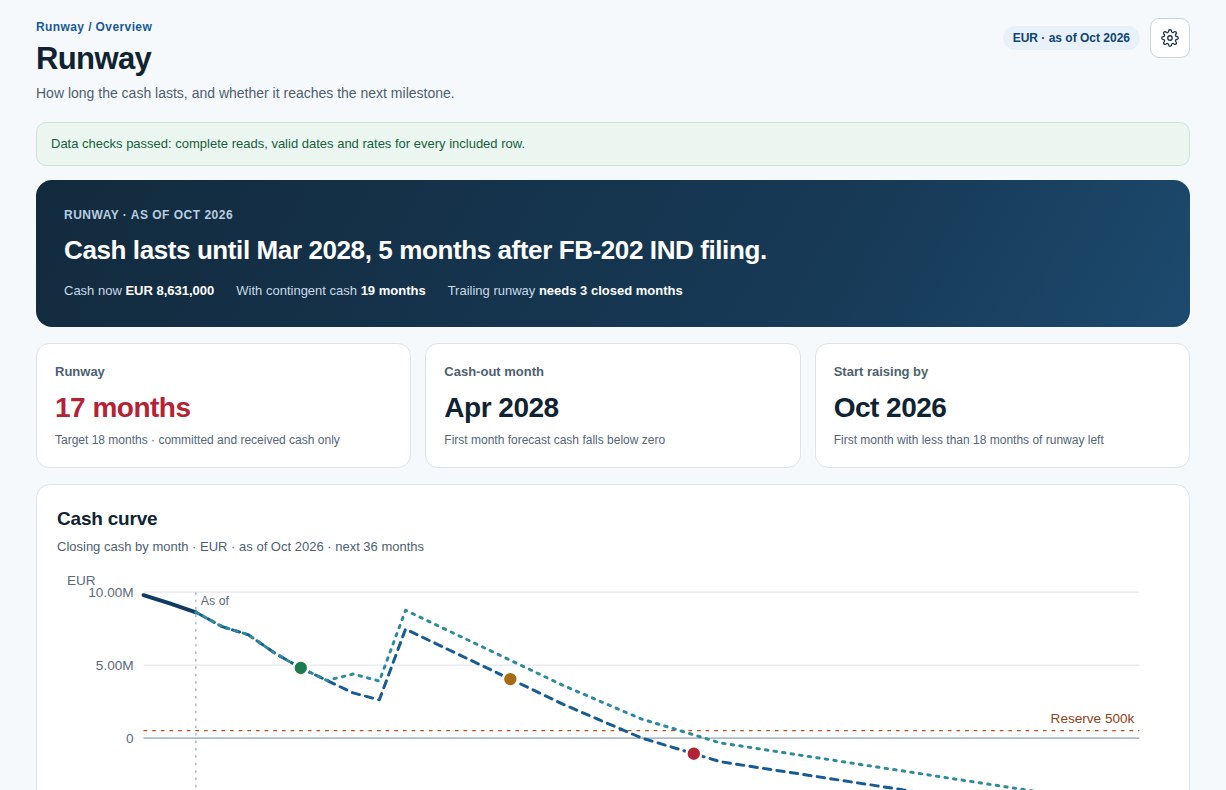
Customize the whole app through conversation
Runway is a starting point. Ask ChatGPT to reshape fields, layouts, charts, views and workflows—or build a new bespoke app for a different job. That is the value of TrialAgents’ unlimited customization possibilities: your team can change the software itself.
Adapt Runway for our weekly leadership review. Put cash at the next milestone and scenario comparisons first. Keep our existing records, permissions and data connections. Show me the revised app before saving.
What happens: the assistant prepares a layout or app revision for review. New fields may also require a schema change. Review the finished version, then save it to the existing app. Customization remains subject to platform capabilities and access.
Connect cash planning to more TrialAgents apps
Add apps as your operations grow. Runway can reuse authorized program records and display key milestones from the Programs app when the data connections are configured.
Connect Runway to our existing Programs data. Show which tables and milestone records can be reused, preserve the existing data, and ask me to review the proposed connections.
Check the result: confirm the intended program names and milestone sources appear in Runway. Connections are explicit; installing an app does not automatically connect every table. Start with one useful link, then expand to other supported workflows.
Turn a what-if question into a scenario
Use the conversation to define a decision clearly, then use Runway’s Scenarios screen to inspect its cash impact.
What if our financing closes four months later and we pause Program B from January? Identify the affected records and explain the scenario changes. Keep the live forecast unchanged.
What happens: the assistant identifies the funding-date and program changes. Add them in Scenarios to preview the result. If the funding is contingent, compare the view that includes contingent cash as well as the base forecast.
Check cash at the relevant milestone and the cash-out date. Preview, save and adopt are different actions: a preview is temporary; saving retains the scenario; adoption changes the live forecast after review.
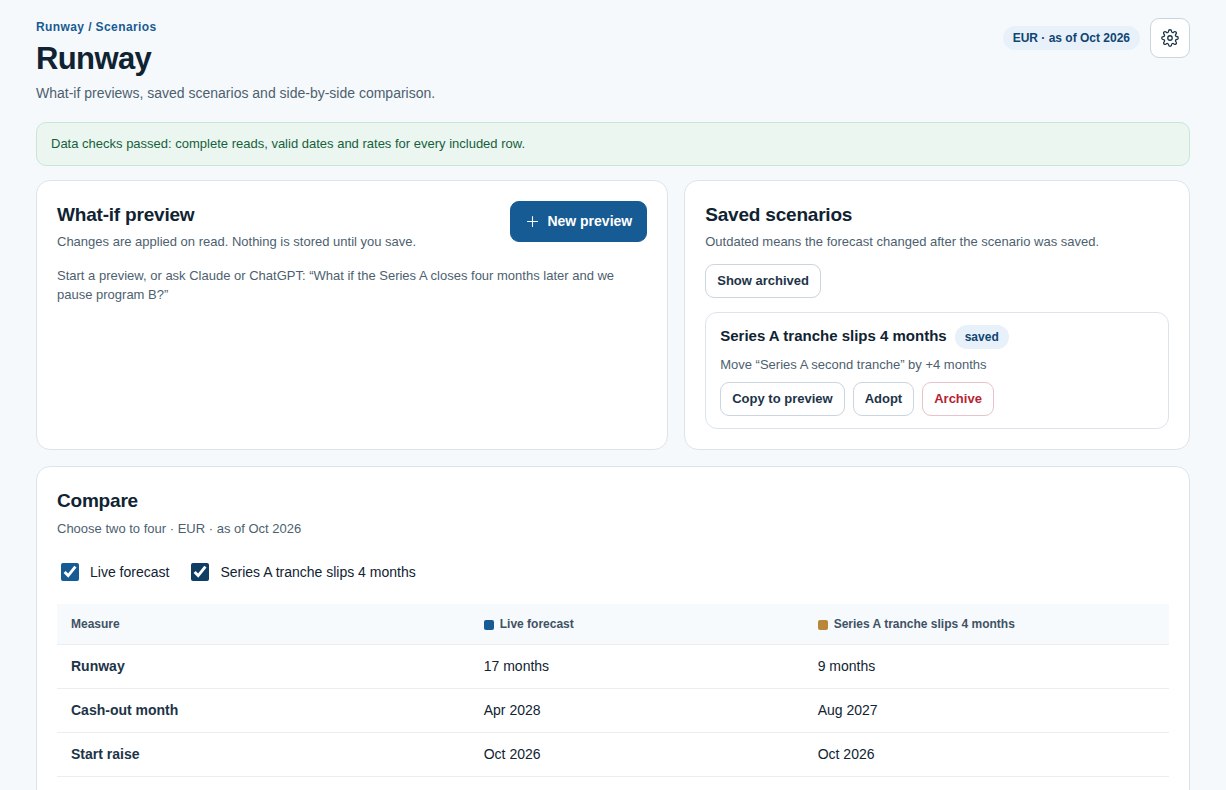
Keep the monthly review under control
Share the relevant financial inputs with ChatGPT and ask it to prepare monthly actuals. A P&L alone is not a confirmed bank balance: resolve the mapping and enter the closing cash balance separately.
Map these monthly figures to our Runway categories and programs. Flag ambiguous entries and propose actuals for review. Do not create or overwrite calculated runway results or frozen snapshots.
Finish in the app: review the proposed inputs, open Actuals → Close month, enter the confirmed balance and complete the reviewed close. Runway creates the frozen monthly snapshot and supports comparison with your locked budget.
- Access: restrict salary fields and manage assistant access through TrialAgents. Hiding a tab is not an access control.
- Logs and history: review changes and saved app versions when the plan evolves.
- Optional automation: request a below-target runway email after a monthly close, or an exchange-rate update workflow. Each requires its own setup; the app also works manually.
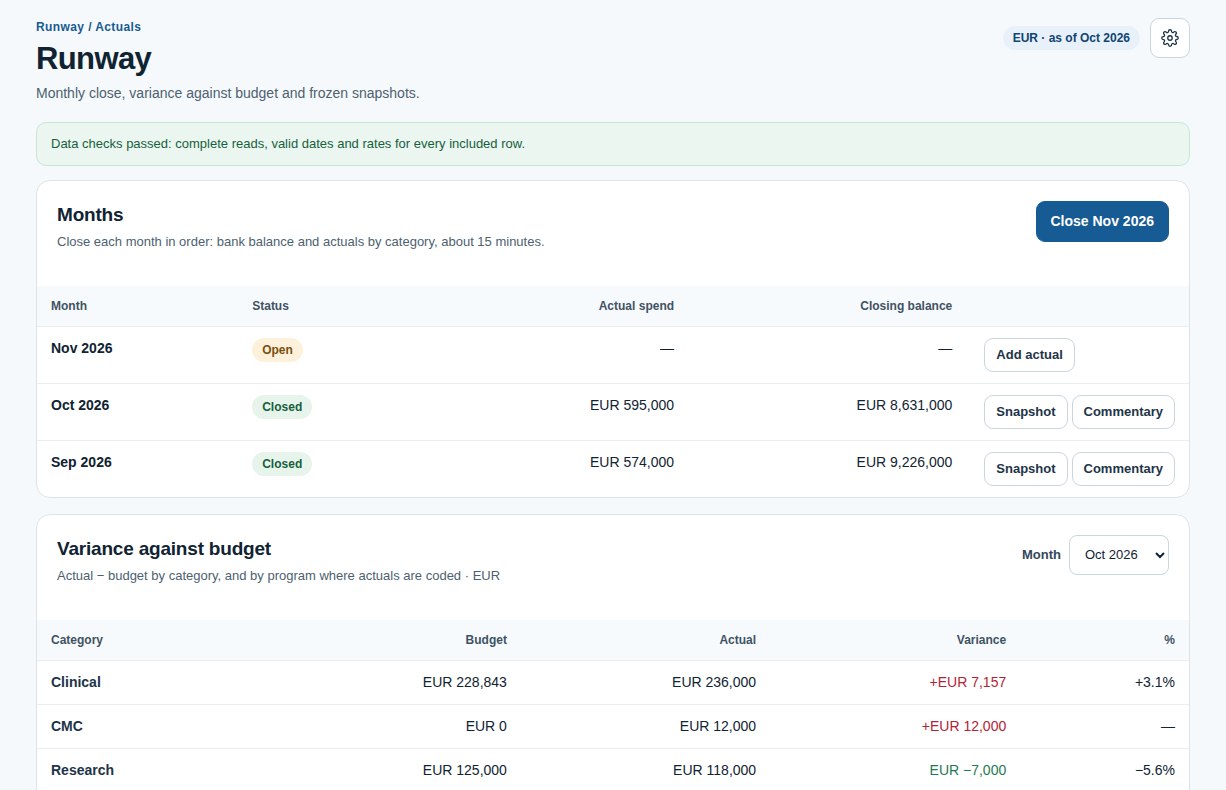
Runway is for monthly cash planning. It does not replace bookkeeping, payroll, bank/accounting synchronization or a full three-statement model.
Start with Runway. Make it your own.
Open the app, establish a reviewed baseline and test one meaningful scenario. Then customize the experience and connect the next operational app your team needs.
Still choosing your approach? Read Runway vs Excel or the biotech cash-runway software shortlist.
Your biotech’s cash planning, inside your conversation.
Use Runway in ChatGPT. Customize the app. Connect the rest of your work.
Start with Runway →