
Assistant-native customization · Series C
Can you build a custom cash runway app with ChatGPT or Claude?
Yes—start with a clear change brief, keep the financial model explicit and verify the saved app before your team relies on it.
First-party editorial: we make TrialAgents Runway. Reviewed against current product documentation on 14 November 2026. The prompts below are a proposed workflow, not a completed ChatGPT or Claude acceptance test.
Start with the app, then decide what to change
You can ask ChatGPT or Claude to customize a saved TrialAgents Runway app—or prepare a bespoke app when the standard model does not fit. The useful deliverable is a reusable, reviewed app with persistent data, not just a forecast written in a chat response.
TrialAgents connects apps to supported ChatGPT and Claude workflows, including an interactive interface where the host supports it and continuation in the browser. Customization can extend to fields, views, layouts, charts and logic. Other apps can join through explicitly connected shared data; access controls and optional automations support the workflow. Those possibilities still depend on authorized operations and the supported runtime.
Before starting, connect your TrialAgents account, identify the workspace and saved app, and confirm the assistant can read and revise it. Check the actual host’s available actions and display support. Claude’s connector guidance distinguishes authentication, source permissions and allowed actions; a connection alone does not prove an app interface works. This article does not establish identical behavior across hosts.
| Need | Route | Review focus |
|---|---|---|
| Different screen order or emphasis | Use the native layout gear where supported | Presentation; existing records and model stay intact |
| A new view over existing inputs | Request a revision of the saved app | Read scope, missing-data states and unchanged calculations |
| A new stored field or spend category | Review the schema change and app revision separately | Existing values, field mapping and all affected screens |
| A different financial model | Specify and validate a bespoke implementation | Formulas, timing, units, reconciliation and maintenance owner |
The standard Runway model covers monthly cash planning, people costs, scenarios, budgets and monthly closes. A new layout does not add bank feeds, payroll, three-statement accounting or 13-week liquidity calculations. Those require separately implemented and validated capabilities.
Describe a review decision, not a vague dashboard
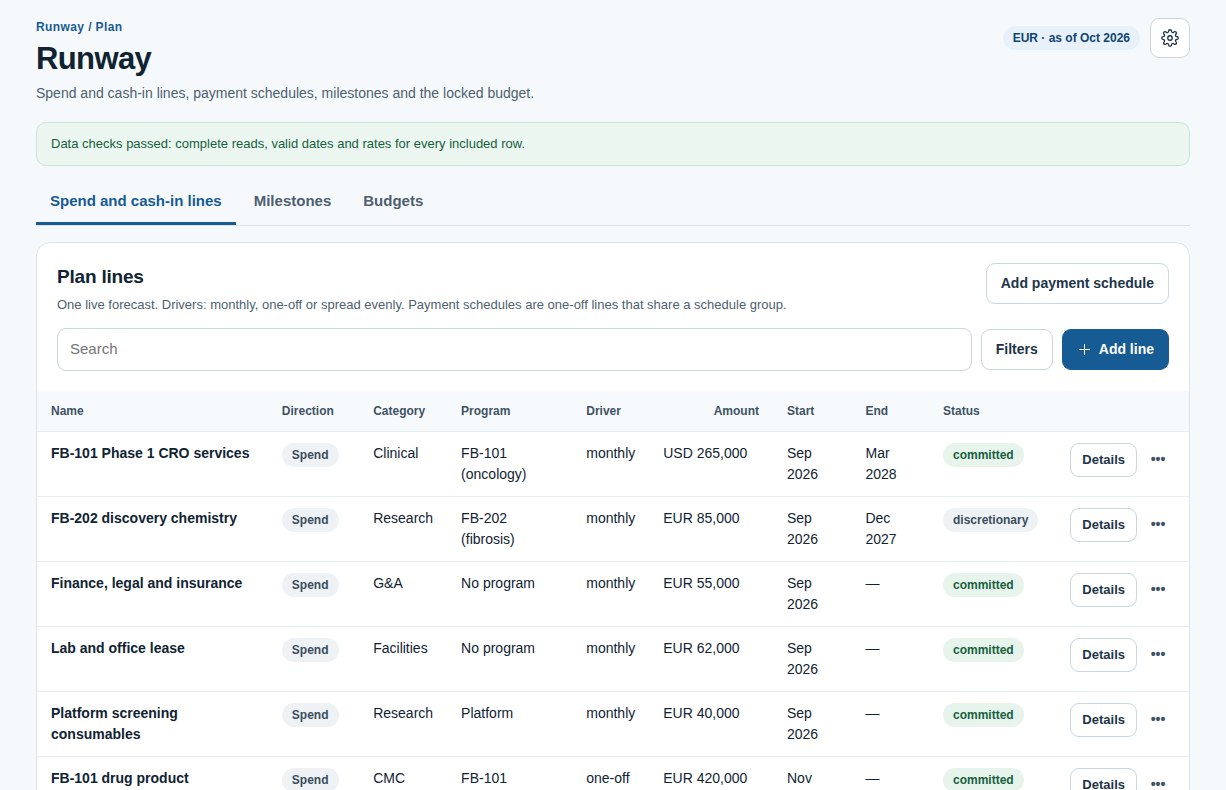
Imagine a small biotech whose operations lead needs to explain planned vendor payments before a funding review. The existing Plan records already contain names, programs, amounts, dates, status and notes. A useful first customization is a proposed read-only “Funding review” view that makes those inputs easier to inspect.
Start with existing notes rather than creating a second set of assumptions. Keep cash-in and spend visibly separate. Label each amount’s currency and timing: a recurring monthly line and a one-off payment are not comparable totals. If you need a new owner or review-date field later, scope that as a separate stored-data change.
Open my saved Runway app and confirm its workspace and version. Prepare a read-only Funding review view grouped by program, showing each accessible Plan line’s name, direction, amount, currency, driver, dates, status and existing notes. Keep missing programs visibly unavailable. Preserve the same app, data bindings, permissions, inputs and calculation logic. Do not invent a total by adding mixed currencies or recurring and one-off amounts. Show the proposed change for review before saving.
The expected result is a preview of an app revision, plus a clear account of what it reads and changes. The proposed Funding review view is not a standard Runway screen and is not shown in the screenshot below.
Prove that the change stays within its brief
For this read-only view, the acceptance condition is simple: improve how the team reads the inputs without changing the forecast. Use a separate authorized demo for testing. Do not add fictional records to the operating plan.
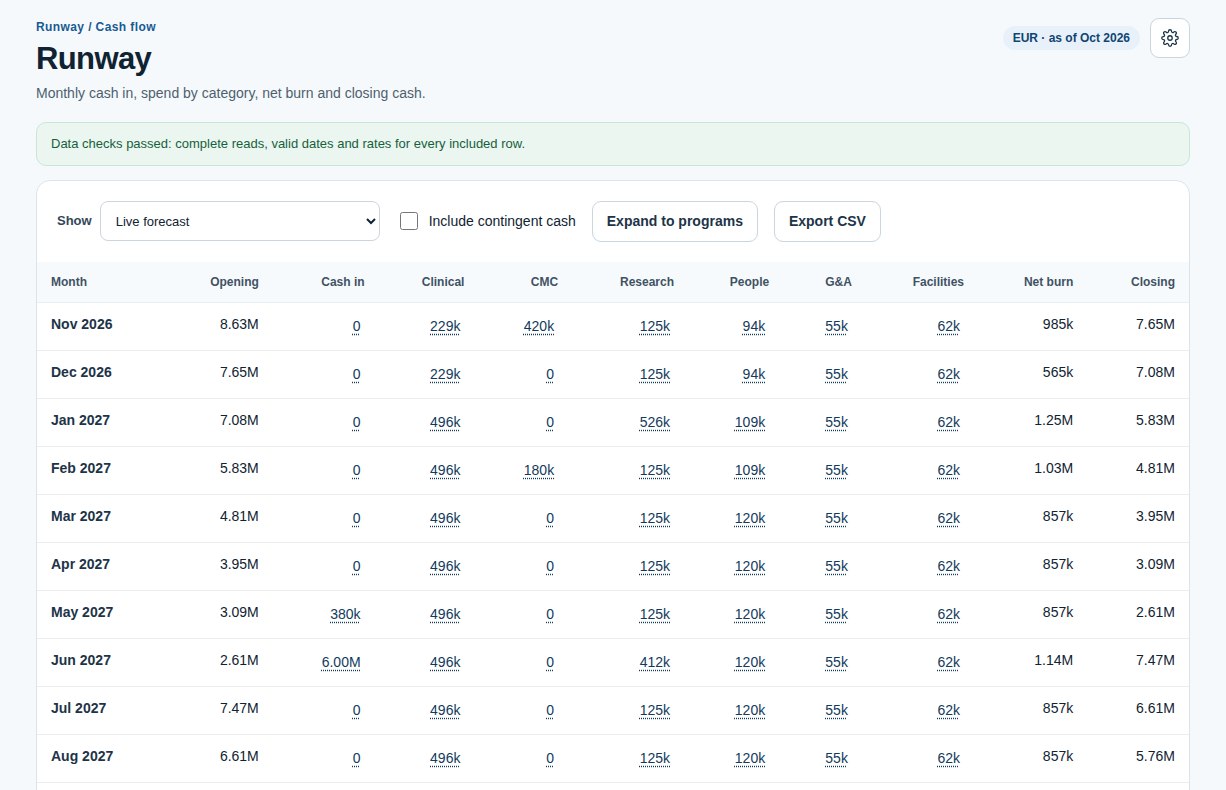
- Capture the baseline. Record the app version, selected reporting currency, as-of month, forecast source and contingent-cash setting. Retain representative input IDs and the displayed monthly cash balances.
- Review the preview. Check one recurring spend line, one one-off payment and one contingent cash-in line. Confirm each value and note matches its source record; the funding status must remain visible.
- Check incomplete access. A missing or restricted record must not become zero, and a partial read must not look like a complete company plan. Display limitations explicitly.
- Approve the exact revision. Confirm that the saved app is being revised, with its IDs, bindings and access preserved. A separate schema or record proposal needs its own review.
- Reopen and reconcile. Open the saved version in the browser. Compare the same inputs and Cash flow settings with the baseline. For this view-only change, every financial output should match.
- Retest after another edit. Change a demo note through the normal reviewed record flow and verify the new view reads that saved value. If approval or saving fails, inspect the saved version before retrying.
Runway’s calculations belong to the app. Ask the assistant to explain a discrepancy and locate its inputs, not overwrite a forecast or frozen monthly snapshot to make a test pass. For a numerical forecasting exercise, use the separate Claude cash-flow review.
Keep connections and maintenance explicit
Once the view is useful, decide whether it needs another app’s data. For example, Runway can consume authorized Programs milestones through a configured read-only connection. Reuse the intended records and verify the selected source; installing another app is not evidence that the correct data is connected. A hidden tab is also not a substitute for access control.
Keep automation separate from the first acceptance test. A saved app should remain usable without a task running. If you later commission reminders or research, define the trigger, read scope, allowed output and recipient independently; customization in Claude does not establish a Claude background runner.
Assign an owner to the revised app. Record the change brief, reviewed version and checks so a later adjustment can be compared with the last working behavior. Recheck after schema, calculation, permission or host changes. For connection-specific review, see the MCP scope and recovery guide.
Start with Runway
Begin with a reusable biotech cash plan, then shape the app around the decisions your team needs to make.
Start with Runway →