
Assistant-native decisions · Series C
AI CFO vs AI-native financial planning app: what does a biotech startup need?
Choose the work you want to delegate—and keep a named owner for the assumptions and decision.
First-party editorial: we make TrialAgents Runway. Primary documentation reviewed 14 November 2026. The exercise below is illustrative, not a completed host or vendor acceptance test.
Buy a defined workflow, not a job title
If your biotech needs a reusable place to plan cash, hiring and program commitments, start with a planning app. If you need software to maintain a connected financial model and surface issues, evaluate the specific “AI CFO” product’s actions and controls. These categories overlap. Neither label tells you who checks an assumption or approves the resulting business decision.
TrialAgents Runway provides a structured monthly cash model through supported ChatGPT and Claude workflows and the browser. TrialAgents can support an interactive app in compatible chat surfaces, conversational operations and whole-app customization: fields, views, logic and workflows, including bespoke apps. You can add operational apps with explicitly configured shared data, then set access and optional automations. Connections and permissions need setup; the standard Runway app does not automatically import your bank or accounting records.
“AI CFO” is also a product description. For example, cfo.ai describes its Ari agent as maintaining a model from connected systems, answering questions and proactively raising issues. It documents deterministic calculations, source lineage, reversible writes and permission-controlled MCP access. Those are substantive capabilities, not merely chat commentary. They are vendor-documented here, not independently tested; confirm your integrations and approval policy. For a product-level comparison, see Runway vs cfo.ai.
| Need | Useful software responsibility | Human review to retain |
|---|---|---|
| Understand a cash change | Trace inputs, calculate and summarize differences | Confirm source completeness and the explanation |
| Plan a hire or CRO commitment | Keep dated inputs and compare scenarios | Validate operational need, timing and contractual assumptions |
| Maintain finance-system data | Supported connections, mappings and refreshes | Reconcile what arrived and what was excluded |
| Decide what to fund | Expose trade-offs and prepare a decision brief | Choose the action and name its accountable owner |
Separate access, calculations and approval
A file upload gives an assistant material to analyze. An MCP connection exposes configured tools. Neither alone proves a persistent planning app, an embedded interface or an unattended workflow. Claude’s connector guidance distinguishes connected-service permissions, action restrictions and interactive connectors. Shared credentials require particular attention to their access scope.
| Surface | Documented role | Check before relying on it |
|---|---|---|
| ChatGPT | Authorized app work, proposed changes and customization | Requires connection and access; current interactive UI and execution not tested here |
| Claude | Authorized app work, proposed changes and customization | Requires connection and access; do not infer parity with ChatGPT |
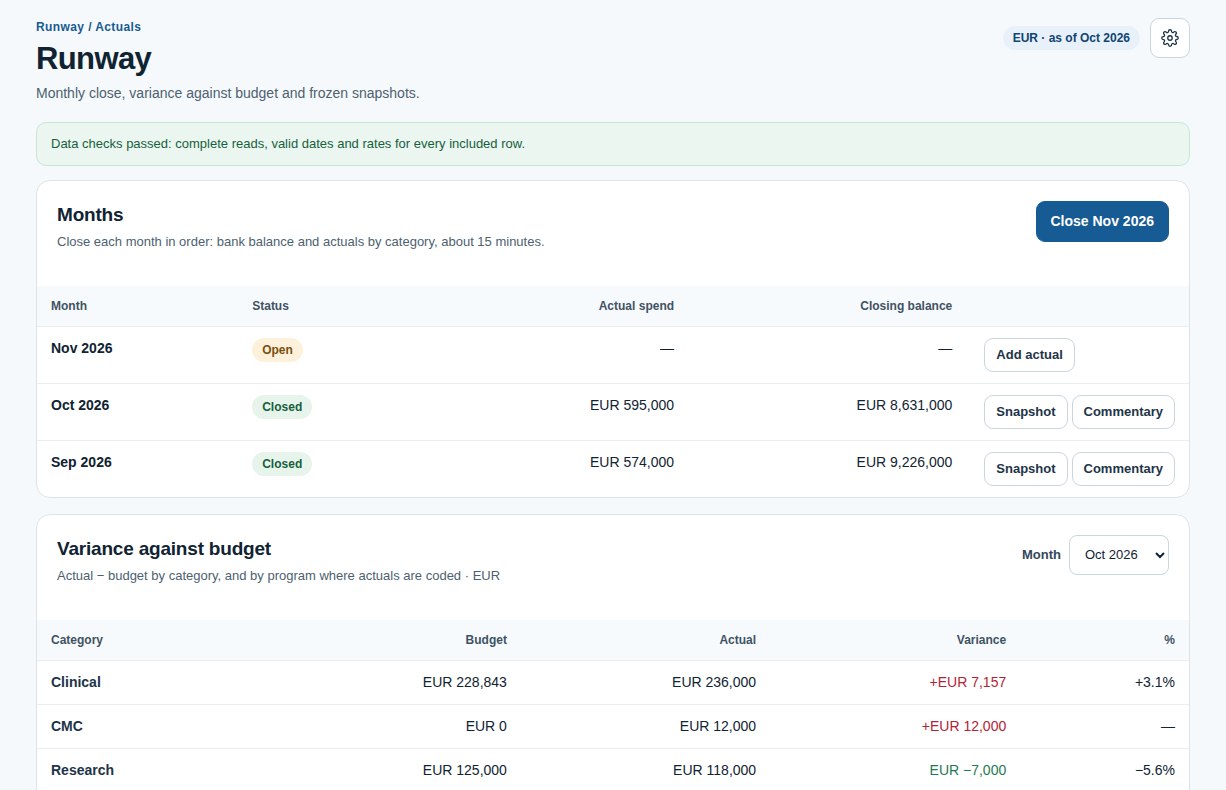
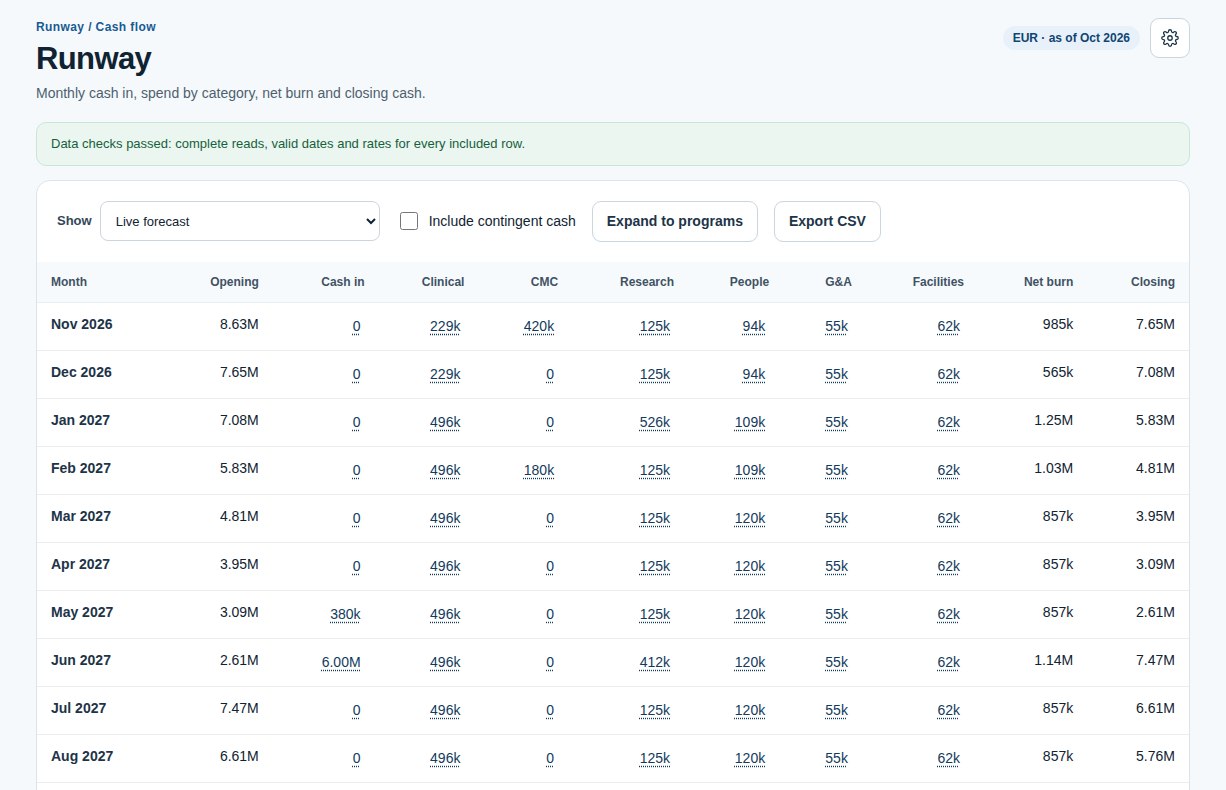
| Browser | Runway inputs, calculated cash, scenario previews and reviewed saves | Version 2.1 documentation and genuine demo media reviewed |
| Scheduled work | Separately configured optional workflow | No background runner is established by this article |
Runway calculates its outputs; the assistant should prepare inputs and commentary. Its reviewed writes, scenario previews and frozen month-close snapshots serve different purposes. If required data is incomplete or restricted, resolve that condition before relying on an exact total. Continue in the browser if the assistant is unavailable.
Test the handoff with one hiring decision
Use an authorized demo workspace with Runway saved and complete input access. This six-step exercise tests the division of work, not whether an assistant sounds like a CFO.
- Set the baseline. In a separate fictional demo, use EUR 1.2m opening cash at 31 December 2026, EUR 100,000 monthly committed G&A spend January–December 2027, zero reserve and no cash receipts, FX effects or other positions.
- Describe one proposal. A planned hire starts in April at EUR 120,000 annual salary with a 20% loaded-cost assumption. Finance checks the currency and full cost; the hiring manager checks the start date. These are illustrative inputs, not salary advice.
- Review the records. Ask the assistant to identify the needed Settings, Plan and People inputs and propose them for review. Inspect the exact changes before approving. Do not ask it to write derived runway numbers.
- Inspect app calculations. In Cash flow, compare the no-hire baseline with the reviewed hiring case. Monthly people cost should be EUR 12,000 from April. Reconcile the months below; stop if the app differs and inspect inputs.
- Write a decision brief. Ask for the changed assumptions, the first negative month, unresolved questions and an owner for each. A plausible answer without a traceable app result does not pass.
- Keep the approved version. Reopen the saved records and verify them. If you instead use a scenario preview, saving and adoption are separate reviewed steps. Retain the leadership decision outside the numeric conclusion.
Use only the reviewed Runway results I confirm. Explain the cash effect of the April hire, identify unresolved input questions, and separate the hiring manager’s assumptions, finance’s reconciliation and leadership’s decision. Do not change records or recommend an action solely from runway months.
| Month | Without hire | April hire |
|---|---|---|
| March | 900 | 900 |
| April | 800 | 788 |
| November | 100 | 4 |
| December | 0 | −108 |
The hire adds EUR 108,000 of cash outflow over April–December: 120,000 ÷ 12 × 1.20 × 9. The hiring case first turns negative in December; the baseline reaches zero then, which is not a cash cushion. We make no claim about later months because the example’s recurring spend ends in December.
Choose the missing responsibility
Choose Runway when the missing piece is a customizable biotech operating plan that your team can maintain with an assistant. Evaluate a connected AI finance product when maintaining a broader model from supported business systems is central. If nobody can validate the assumptions, interpret financing choices or own the decision, add qualified finance support alongside the software.
The standard Runway model is monthly, with no native bank feed, bookkeeping, payroll, integrated three-statement model or 13-week liquidity engine. A hiring decision also needs operational and within-month cash review. For a deeper assistant recipe, use our Claude cash-forecast review. The useful outcome is a saved, reconciled plan and an explicit decision owner—not a more impressive AI title.
Start with Runway
Give your biotech team a reusable home for cash assumptions, scenarios and reviewed decisions.
Start with Runway →