
Implementation resource · Series E
Cash runway software for small biotechs: scope, costs and implementation
Turn a software choice into an approval brief with a defined first release, a complete cost estimate and a named owner for the first close.
First-party guidance from TrialAgents, reviewed against Runway 2.2 documentation. The worksheet is a planning method, not a vendor quote or implementation benchmark. Genuine Runway 2.1 browser demos show fictional data.
For a small biotech, implementing cash runway software means agreeing who maintains the forecast as well as choosing its features. Start with one monthly planning cycle: current cash, expected payments, people costs, financing assumptions and a reviewed close. Budget setup and ongoing work separately. Expand the workflow only after those inputs reconcile.
Define the first release around a decision
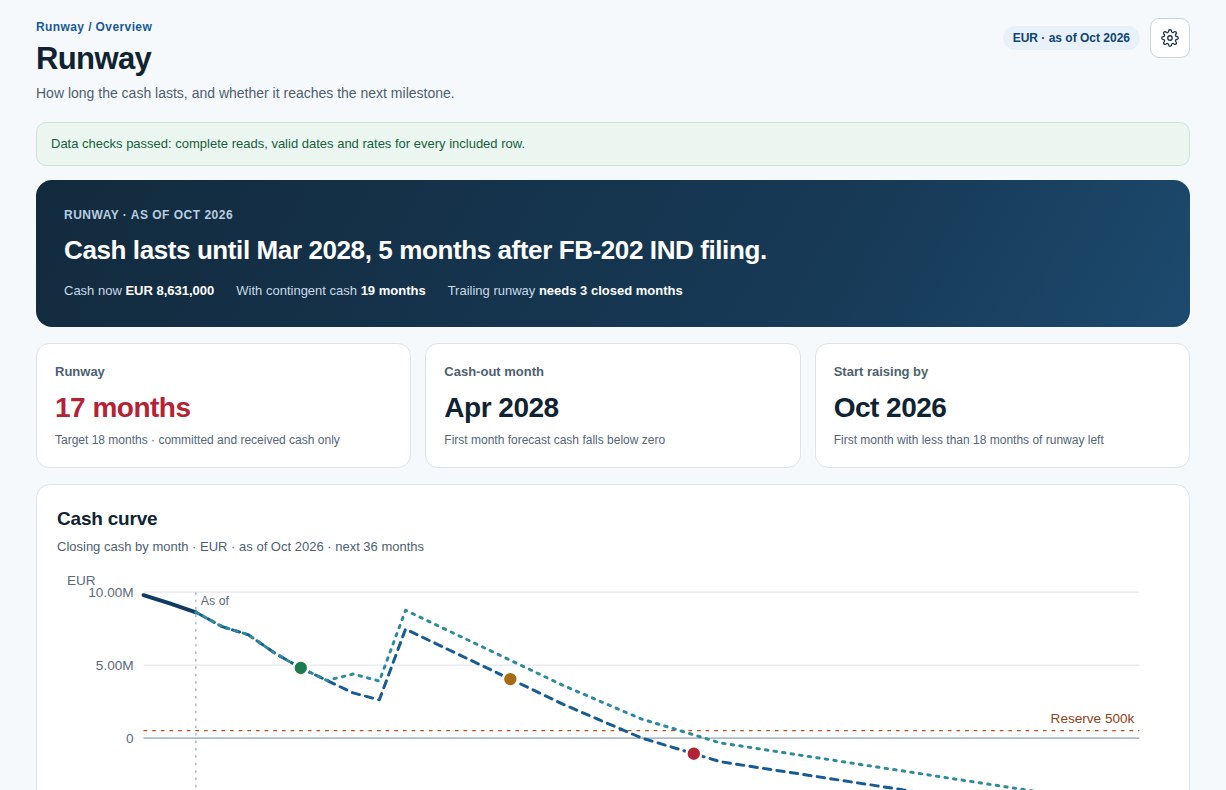
A useful first-release question is: “Does our current plan fund the next program milestone, and what changes if financing moves?” TrialAgents Runway brings that monthly planning workflow to connected ChatGPT and Claude setups and the web. Confirm supported app actions and permissions in your intended host; where app commands are unavailable, use reviewed input proposals and the app’s controls.
Customization can cover fields, layouts, charts and app logic, or a bespoke app. Separate presentation changes from changes to calculations: the latter need their own specification and validation. A custom request is not a standard feature simply because it is possible to build.
Next, decide which operational apps to connect. Runway supports explicit links to Programs, CRO Selection, Contracts and Fundraise information. Linked source records are read-only in Runway; adding them to Plan and applying later changes are reviewed steps. Avoid budgeting an automatic accounting feed that the standard app does not provide.
Then assign controls: who edits inputs, reviews scenarios, closes a month and sees salary data. Optional automations need configuration and authorized access. Runway uses app-level access and database restrictions, not per-tab permissions; salary restrictions can withhold live people costs and live runway while approved snapshots preserve frozen totals.
| Include and reconcile | Handle separately |
|---|---|
| Monthly Plan lines, People costs, financing assumptions and FX rates | Bookkeeping, payroll and native bank/accounting feeds |
| Scenario review, locked budget and monthly actuals/snapshots | Integrated three-statement planning and entity consolidation |
| Monthly cash outlook against program milestones | Daily liquidity or an external 13-week cash model |
Estimate the work around the subscription
A subscription quote is one input to the decision. Use the worksheet below to record your own amounts, owners and evidence. This applies a general procurement principle to the app rollout: UK government hosting guidance advises selecting for requirements, not cost alone, and estimating exit costs. It is not a biotech-specific cost benchmark.
| Cost bucket | What to enter | Evidence to retain |
|---|---|---|
| Setup cash | External implementation, data preparation, training and approved customization fees | Written scope, quote and acceptance criteria |
| Recurring cash | Subscription plus separately charged support, connectors or usage, if applicable | Billing frequency, allowances, renewal terms and exclusions |
| Internal effort | Setup hours plus monthly upkeep hours, valued at your chosen internal hourly cost | Named people, tasks and explicit rate assumption |
| Overlap and change | Old-system charges during cutover and separately approved change allowances | Retirement date and unpriced requirements |
| Exit scenario | Export, reconstruction and transition effort if you later leave | Export sample, retained source records and contract terms |
12-month cash budget = setup cash + recurring charges due in the period + overlap charges + approved cash allowance. If every recurring charge is monthly and unchanged for a full year, that component is 12 × the monthly total. Use actual payment dates for annual prepayments or contracts that start partway through the period.
Internal effort value = (setup hours + 12 × monthly upkeep hours) × internal hourly cost. Show this alongside the cash budget. Existing salaried time is not automatically an additional cash payment; do not count it twice. Keep a possible future exit scenario separate unless exit is actually planned within the period.
Request current terms for your actual scope. This guide does not state vendor prices, assume a paid connector exists, or promise a deployment time. An unquoted requirement stays an open item rather than becoming zero in the estimate.
Approve evidence at each rollout step
Prepare: finance owns the opening bank balance and month-end date; operating leads confirm program timing and expected vendor payments; the people-data owner confirms staffing assumptions. Separate contingent funding from committed receipts. Keep the source workbook and statements available for reconciliation.
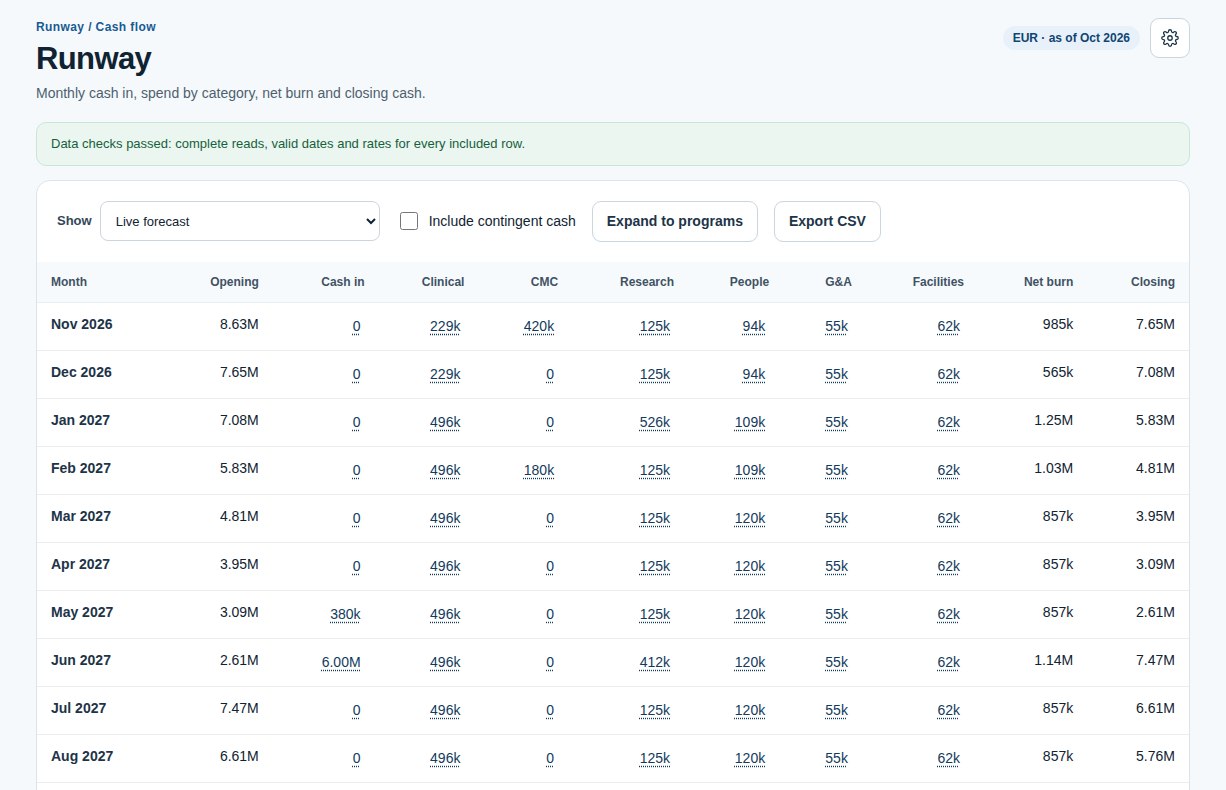
Configure and pilot: set reporting currency, categories, programs and rates; populate Plan and People without duplicating salaries in aggregate spend. Review Cash flow month by month. Resolve missing-rate warnings before accepting totals: Runway flags and excludes affected rows. Use the dashboard setup guide for a small isolated acceptance case.
Accept the first close: reconcile one completed month to its closing cash and actual categories, explain differences from budget, then use the app’s month-close controls. Review a scenario without treating its preview as an adopted plan. Check the intended reader’s access, including the effect of salary restrictions.
Operate: name the monthly owner and backup, the input deadline and the reviewer. Record which source changes need review, who maintains FX rates and which automations are configured. Measure effort during your own pilot before committing to an ongoing workload; do not borrow an implementation-time claim from a generic software demo.
Copy this approval brief
- Decision and scope: the question this release must answer, included features and explicitly excluded work.
- Cost and capacity: 12-month cash budget, internal effort estimate, quote dates and unresolved items.
- Acceptance: reconciled opening position, first close, scenario review and tested reader access.
- Ownership: implementation lead, monthly finance owner, operational contributors and backup.
- Continuity: retained source records, export check and conditions for changing or leaving the system.
For Runway, Cash flow export supplies copyable CSV text and platform database tables offer CSV downloads; neither promises an executable copy of the financial model. Include a handover explanation for custom logic. Approve the rollout when its scope, cost assumptions and acceptance evidence are clear—not merely when the app has been installed.
Start with Runway
Bring a defined monthly planning scope and use the first close to confirm the workflow fits your team.
Start with Runway →